Preparing EEG data
The next step in the pipeline is to prepare the EEG data for TRF analysis. This step performs three main tasks:
- Converts the EEG data into
NDVarobjects used by theeelbrainpackage. - Matches each EEG epoch to its corresponding stimulus file.
- Determines how to handle duration differences between EEG epochs and stimulus audio files.
EEG data files
You will use ns.trf.prepare_eeg(). The usage is similar to ns.trf.make_gammatone_predictors(): you can just pass the relevant settings directly as keyword arguments:
import neuraspeech as ns
ns.trf.prepare_eeg(
    eeg_data_path = 'C:/Users/xyc6648/OneDrive - Northwestern University/Desktop/research/ASD_eeg/ICA',
    metadata_path = 'misc/example_metadata.csv',
    output_path = 'eeg/prepared',
    stim_path = 'stim/alice',
    metadata_filename_col = 'filename',
    metadata_stim_col = 'stim',
    channels_to_drop = ['M1', 'M2'],
    duration_mode = 'min',
)
Processing file: C:\Users\xyc6648\OneDrive - Northwestern University\Desktop\research\ASD_eeg\ICA\sub-3000_04_ses-1_task-alice.fif
Processing file: C:\Users\xyc6648\OneDrive - Northwestern University\Desktop\research\ASD_eeg\ICA\sub-3042_04_ses-1_task-alice.fif
Processing file: C:\Users\xyc6648\OneDrive - Northwestern University\Desktop\research\ASD_eeg\ICA\sub-3047_04_ses-1_task-alice.fif
Processing file: C:\Users\xyc6648\OneDrive - Northwestern University\Desktop\research\ASD_eeg\ICA\sub-3048_03_ses-1_task-alice.fif
Processing file: C:\Users\xyc6648\OneDrive - Northwestern University\Desktop\research\ASD_eeg\ICA\sub-3049_03_ses-1_task-alice.fif
Processing file: C:\Users\xyc6648\OneDrive - Northwestern University\Desktop\research\ASD_eeg\ICA\sub-3051_04_ses-1_task-alice.fif
Processing file: C:\Users\xyc6648\OneDrive - Northwestern University\Desktop\research\ASD_eeg\ICA\sub-3060_04_ses-1_task-alice.fif
Processing file: C:\Users\xyc6648\OneDrive - Northwestern University\Desktop\research\ASD_eeg\ICA\sub-3062_03_ses-1_task-alice.fif
Processing file: C:\Users\xyc6648\OneDrive - Northwestern University\Desktop\research\ASD_eeg\ICA\sub-3069_03_ses-1_task-alice.fif
Processing file: C:\Users\xyc6648\OneDrive - Northwestern University\Desktop\research\ASD_eeg\ICA\sub-3070_03_ses-1_task-alice.fif
Processing file: C:\Users\xyc6648\OneDrive - Northwestern University\Desktop\research\ASD_eeg\ICA\sub-3076_04_ses-1_task-alice.fif
Processing file: C:\Users\xyc6648\OneDrive - Northwestern University\Desktop\research\ASD_eeg\ICA\sub-3077_04_ses-1_task-alice.fif
Processing file: C:\Users\xyc6648\OneDrive - Northwestern University\Desktop\research\ASD_eeg\ICA\sub-3078_03_ses-1_task-alice.fif
Processing file: C:\Users\xyc6648\OneDrive - Northwestern University\Desktop\research\ASD_eeg\ICA\sub-3081_05_ses-1_task-alice.fif
Processing file: C:\Users\xyc6648\OneDrive - Northwestern University\Desktop\research\ASD_eeg\ICA\sub-3087_03_ses-1_task-alice.fif
Processing file: C:\Users\xyc6648\OneDrive - Northwestern University\Desktop\research\ASD_eeg\ICA\sub-3088_04_ses-1_task-alice.fif
Processing file: C:\Users\xyc6648\OneDrive - Northwestern University\Desktop\research\ASD_eeg\ICA\sub-3098_03_ses-1_task-alice.fif
Processing file: C:\Users\xyc6648\OneDrive - Northwestern University\Desktop\research\ASD_eeg\ICA\sub-3107_03_ses-1_task-alice.fif
Processing file: C:\Users\xyc6648\OneDrive - Northwestern University\Desktop\research\ASD_eeg\ICA\sub-3110_03_ses-1_task-alice.fif
Processing file: C:\Users\xyc6648\OneDrive - Northwestern University\Desktop\research\ASD_eeg\ICA\sub-3117_03_ses-1_task-alice.fif
Processing file: C:\Users\xyc6648\OneDrive - Northwestern University\Desktop\research\ASD_eeg\ICA\sub-4015_03_ses-1_task-alice.fif
Processing file: C:\Users\xyc6648\OneDrive - Northwestern University\Desktop\research\ASD_eeg\ICA\sub-5027_03_ses-1_task-alice.fif
Processing file: C:\Users\xyc6648\OneDrive - Northwestern University\Desktop\research\ASD_eeg\ICA\sub-5027_05_ses-1_task-alice.fif
Processing file: C:\Users\xyc6648\OneDrive - Northwestern University\Desktop\research\ASD_eeg\ICA\sub-5100_04_ses-1_task-alice.fif
Processing file: C:\Users\xyc6648\OneDrive - Northwestern University\Desktop\research\ASD_eeg\ICA\sub-5121_03_ses-1_task-alice.fif
Processing file: C:\Users\xyc6648\OneDrive - Northwestern University\Desktop\research\ASD_eeg\ICA\sub-5153_05_ses-1_task-alice.fif
Processing file: C:\Users\xyc6648\OneDrive - Northwestern University\Desktop\research\ASD_eeg\ICA\sub-5172_03_ses-1_task-alice.fif
Processing file: C:\Users\xyc6648\OneDrive - Northwestern University\Desktop\research\ASD_eeg\ICA\sub-5193_03_ses-1_task-alice.fif
Processing file: C:\Users\xyc6648\OneDrive - Northwestern University\Desktop\research\ASD_eeg\ICA\sub-5197_03_ses-1_task-alice.fif
Processing file: C:\Users\xyc6648\OneDrive - Northwestern University\Desktop\research\ASD_eeg\ICA\sub-5379_03_ses-1_task-alice.fif
Processing file: C:\Users\xyc6648\OneDrive - Northwestern University\Desktop\research\ASD_eeg\ICA\sub-5390_03_ses-1_task-alice.fif
Processing file: C:\Users\xyc6648\OneDrive - Northwestern University\Desktop\research\ASD_eeg\ICA\sub-5433_04_ses-1_task-alice.fif
Processing file: C:\Users\xyc6648\OneDrive - Northwestern University\Desktop\research\ASD_eeg\ICA\sub-5436_03_ses-1_task-alice.fif
Processing file: C:\Users\xyc6648\OneDrive - Northwestern University\Desktop\research\ASD_eeg\ICA\sub-5496_03_ses-1_task-alice.fif
Processing file: C:\Users\xyc6648\OneDrive - Northwestern University\Desktop\research\ASD_eeg\ICA\sub-5543_03_ses-1_task-alice.fif
Processing file: C:\Users\xyc6648\OneDrive - Northwestern University\Desktop\research\ASD_eeg\ICA\sub-5594_03_ses-1_task-alice.fif

Done. Successfully prepared EEG datasets have been saved to: C:\Users\xyc6648\OneDrive - Northwestern University\Desktop\scripts\neuraspeech\neuraspeech\trf\eeg\prepared
Here are the main arguments you may want to change or check:
eeg_data_path: Path to the '.fif' EEG data files mentioned in the Getting Started section.metadata_path: Path to the metadata file mentioned in the Getting Started section.output_path: Directory where the prepared EEG data will be saved.stim_path: Path to the folder containing the stimulus audio files.metadata_filename_col: Name of the column in the metadata spreadsheet that contains the EEG data filenames.metadata_stim_col: Name of the column in the metadata spreadsheet that lists the stimulus filenames corresponding to the EEG epochs.channels_to_drop: List of EEG channels to remove from the data. In this example, the two mastoid electrodes are still included in the EEG files, so we drop them here.duration_mode: EEG epochs may be longer than the corresponding stimuli or the stimulus files may differ in duration. This argument specifies how to handle duration differences. Three options are currently available:'min': Truncate all EEG epochs and stimulus predictors within each EEG data file to the shortest stimulus duration in that file. For example, if one EEG file contains five epochs corresponding to five audio tracks, and the shortest track is 50 s, then all epochs and predictors from that file will be truncated to 50 s before TRF analysis.'fixed': Use a fixed duration for all epochs across all EEG data files. Ifduration_mode = 'fixed', you must also providefixed_duration, which specifies the duration in seconds, for example,fixed_duration = 45. The fixed duration cannot be longer than the shortest stimulus duration in the dataset.'concat': See below.
The
duration_modesetting will truncate the EEG accordingly in the output files but won't affect the stimulus predictors. However, it stores information about how duration was handled. The downstream TRF code will use this information to truncate the predictors when fitting the models.
Again, paths can be relative or absolute. Relative paths are interpreted relative to the trf module folder inside the neuraspeech package.
Please check the output carefully for any warnings. The function will try to catch issues such as mismatches between the number of EEG epochs and the number of stimuli listed in the metadata file. Files with these issues will be skipped and will not be saved to the output directory. Fix any warnings or skipped files before moving on to the next step.
If you load one of the prepared EEG output files, you should see something like this. The file contains the metadata associated with the EEG recording, plus the stimulus file for each epoch (stim) and duration_mode. It also contains the EEG data itself as an eelbrain.NDVar object.
import eelbrain
example_eeg_path = 'examples/sub-3000_04_ses-1_task-alice.pickle'
example_eeg = eelbrain.load.unpickle(example_eeg_path)
example_eeg
| # | filename | sub | ses | task | duration_mode | stim |
| 0 | sub-3000_04_ses-1_task-alice.fif | 3000_04 | 1 | alice | min | track1.wav |
| 1 | sub-3000_04_ses-1_task-alice.fif | 3000_04 | 1 | alice | min | track2.wav |
| 2 | sub-3000_04_ses-1_task-alice.fif | 3000_04 | 1 | alice | min | track3.wav |
| 3 | sub-3000_04_ses-1_task-alice.fif | 3000_04 | 1 | alice | min | track4.wav |
| 4 | sub-3000_04_ses-1_task-alice.fif | 3000_04 | 1 | alice | min | track5.wav |
| 5 | sub-3000_04_ses-1_task-alice.fif | 3000_04 | 1 | alice | min | track6.wav |
| 6 | sub-3000_04_ses-1_task-alice.fif | 3000_04 | 1 | alice | min | track7.wav |
| 7 | sub-3000_04_ses-1_task-alice.fif | 3000_04 | 1 | alice | min | track8.wav |
| 8 | sub-3000_04_ses-1_task-alice.fif | 3000_04 | 1 | alice | min | track9.wav |
| 9 | sub-3000_04_ses-1_task-alice.fif | 3000_04 | 1 | alice | min | track10.wav |
| 10 | sub-3000_04_ses-1_task-alice.fif | 3000_04 | 1 | alice | min | track11.wav |
| 11 | sub-3000_04_ses-1_task-alice.fif | 3000_04 | 1 | alice | min | track12.wav |
| 12 | sub-3000_04_ses-1_task-alice.fif | 3000_04 | 1 | alice | min | track13.wav |
| 13 | sub-3000_04_ses-1_task-alice.fif | 3000_04 | 1 | alice | min | track14.wav |
| 14 | sub-3000_04_ses-1_task-alice.fif | 3000_04 | 1 | alice | min | track15.wav |
Using the configuration file
Again, you can also run ns.trf.prepare_eeg() by using the configuration file instead of keyword arugments:
# Load the configuration. By default it loads from 'neuraspeech / trf/ conf / conf.yaml', but you can pass a path to a different configuration file.
config = ns.trf.load_config()
ns.trf.prepare_eeg(config)
Pro tips
1. Concatenate EEG and stimulus predictors
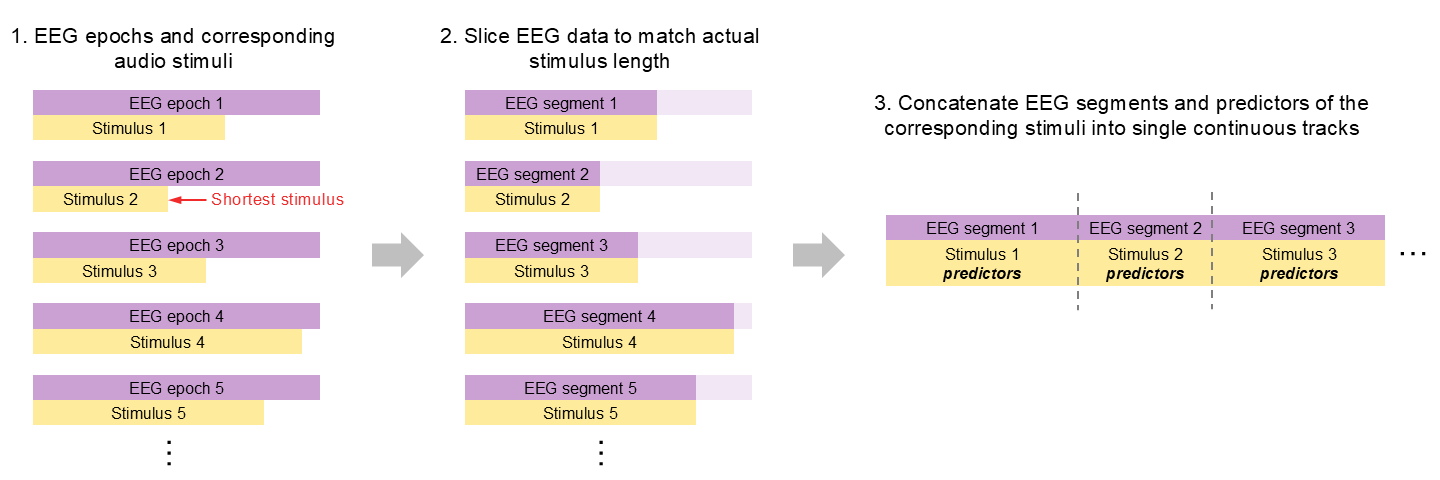
In the example above, all EEG epochs within each data file were trimmed to the minimum stimulus length before building the dataset. This approach is usually OK when stimuli have similar durations. However, it can lead to substantial data loss when stimulus lengths vary considerably, as illustrated in the left panel of the diagram below.
To avoid this issue, ns.trf.prepare_eeg() allows users to set duration_mode to 'concat'. In this mode, each EEG epoch is truncated only to the actual duration of its corresponding stimulus. The resulting EEG segments, together with their matching stimulus predictors, are then concatenated to form a single continuous track, as shown below:
To use this mode, do the following:
ns.trf.prepare_eeg(
    eeg_data_path = 'C:/Users/xyc6648/OneDrive - Northwestern University/Desktop/research/ASD_eeg/ICA',
    metadata_path = 'misc/example_metadata.csv',
    output_path = 'eeg/prepared',
    stim_path = 'stim/alice',
    metadata_filename_col = 'filename',
    metadata_stim_col = 'stim',
    channels_to_drop = ['M1', 'M2'],
    duration_mode = 'concat', # Set to 'concat'
    predictor_set_path = 'predictors/acou_pred_set' # Provide path to the predictor set if using 'concat' mode
)
Note that you will also need to provide the path to the predictor set, as the predictors must be concatenated in the same way as the EEG data. The function will create a new predictor folder using the original predictor set name plus a '_concat' suffix (e.gg., 'acou_pred_set_concat') under the 'predictors' folder.
The concatenated predictors are named using the corresponding EEG filename before the '~' separator (e.g., 'sub-3000_04_ses-1_task-alice~gammatone-1.pickle'. When you open the corresponding EEG output file, you will see that it has only one row with the 'stim' column containing the EEG data filename, which will be used by the TRF code to locate the matching concatenated predictors.
example_eeg_concat
| # | filename | sub | ses | task | duration_mode | stim |
| 0 | sub-3000_04_ses-1_task-alice.fif | 3000_04 | 1 | alice | concat | sub-3000_04_ses-1_task-alice.fif |
2. When an epoch contains mulitple stimuli
So far, we have assumed that each EEG epoch corresponds to a single stimulus audio track, with semicolons (;) used as epoch separators when listing stimuli in the metadata file. However, ns.trf.prepare_eeg() can also handle cases in which one EEG epoch contains multiple stimulus tracks, as long as this is specified correctly in the metadata.
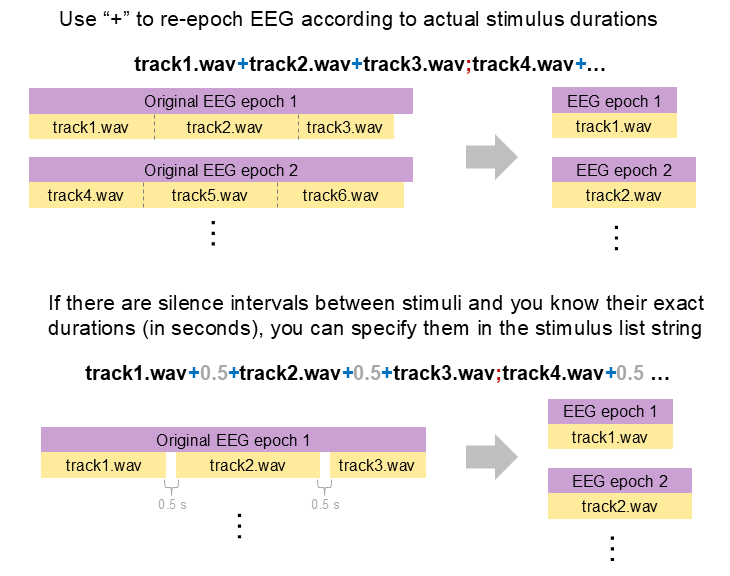
Specifically, use plus signs (+) to indicate the sequence of stimulus tracks within the original EEG epoch. If there are pauses or silence intervals between stimuli, and you know their exact durations in seconds, you can include those durations in the sequence as well. In many cases, this is necessary for re-epoching the EEG data correctly.
See the example metadata and schematic figure below for an illustration of how this works.
example_metadata.head(5)
| filename | stim | |
|---|---|---|
| 0 | sub-01_ses-1_task-60bi_acq-2.fif | track16.wav+track17.wav+track18.wav+track19.wav+track20.wav;track21.wav+trac... |
| 1 | sub-01_ses-1_task-60mo_acq-1.fif | track1.wav+track2.wav+track3.wav+track4.wav+track5.wav;track6.wav+track7.wav... |
| 2 | sub-01_ses-1_task-75bi_acq-3.fif | track31.wav+track32.wav+track33.wav+track34.wav+track35.wav;track36.wav+trac... |
| 3 | sub-01_ses-1_task-75mo_acq-4.fif | track46.wav+track47.wav+track48.wav+track49.wav+track50.wav;track51.wav+trac... |
| 4 | sub-01_ses-2_task-60bi_acq-2.fif | track16.wav+track17.wav+track18.wav+track19.wav+track20.wav;track21.wav+trac... |
However, it is generally recommended to avoid this kind of re-epoching when possible, because it can introduce potential misalignment issues. If you want each EEG epoch to correspond to a single audio track, it is better to set this up directly in the experiment script before data collection.