Envelope and onset predictors
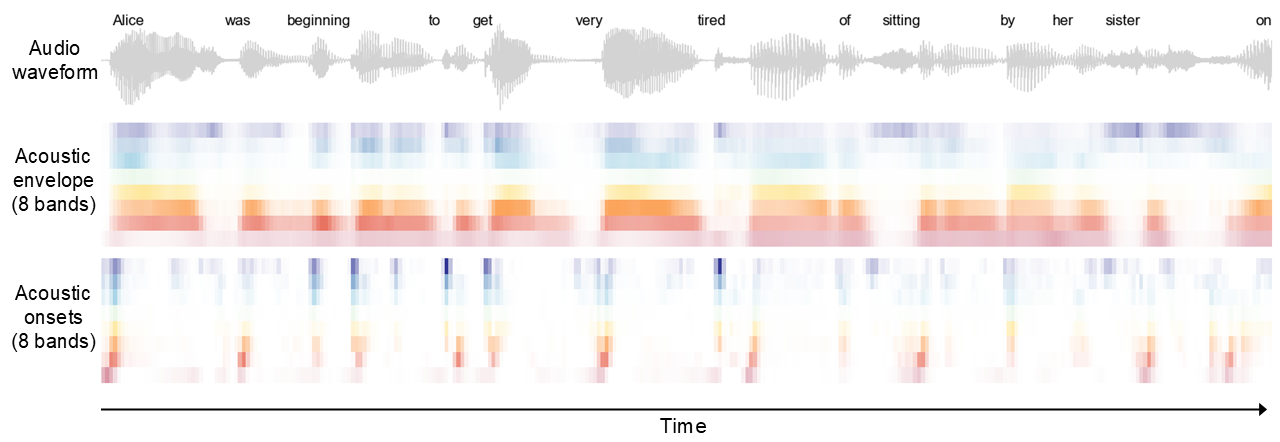
This tutorial will walk you through the steps for running a TRF analysis that predicts EEG responses from continuous acoustic envelope and onset features extracted from the stimulus audio tracks. These acoustic predictors are usually what you want to include in the TRF models for continuous speech/audio listening experiments. They also provide useful sanity checks for data quality and processing, as poor neural tracking or messy TRFs typically indicate issues such as EEG-stimulus misalignment, excessive EEG noise, or other processing problems. The image below shows an example stimulus waveform and its corresponding envelope and onset predictors across eight frequency bands.
Gammatone envelope and onsets
To generate acoustic predictors, we first pass each stimulus through a gammatone filterbank, which approximates the frequency-response characteristics of the cochlea. This produces a gammatone spectrogram for each stimulus. We then sum the energy across N logarithmically spaced frequency bins to obtain an N-band acoustic envelope representation. This representation is essntially a spectrogram, but with a coarser frequency resolution than the spectrograms you typically see in Praat.
We also generate an N-band acoustic onset spectrogram using an auditory edge-detection model. Unlike the envelope representation, the onset predictor emphasizes rapid changes in acoustic energy. It is included because auditory cortical responses are especially sensitive to acoustic transitions (Daube et al., 2019; Yi et al., 2019).
The neuraspeech package provides a convenient interface to the gammatone utilities implemented in eelbrain. In most cases, you can generate usable envelope and onset predictors with the workflow below. For more details about the predictor generation, see the Eelbrain paper.
First, make sure that the neuraspeech envionment is activated and have the neuraspeech folder in the same directory as the script you're currently running. Then import the toolbox:
import neuraspeech as ns
And do:
# Specify the configuration for the gammatone filterbank
gammatone_bank_cfgs = {
    'f_min': 20,        # Minimum frequency in Hz of the filterbank
    'f_max': 8000,      # Maximum frequency in Hz of the filterbank
    'n': 256,           # Number of filter channels (note that this is NOT the number of frequency bands in the final predictor output)
    'location': 'left'  # gammatone sample at beginning of integration window
}
# Supply the gammatone filterbank configuration and other arguments to make_gammatone_predictors() from the trf module
ns.trf.make_gammatone_predictors(
    eeg_sr = 128,
    stim_path = 'stim/alice',
    predictor_set = 'acou_pred_set',
    predictor_name = 'gammatone',
    gammatone_bank_cfgs = gammatone_bank_cfgs,
    c = 30,
    n_bands = 8,
    scale = 'log',
    save_raw_gt_spec = False
    )
Here are the main arguments you may want to change or check:
eeg_sr: Sampling rate of the preprocessed EEG data. All predictors are resampled along the time dimension to match this sampling rate.stim_path: Path to the folder containing the stimulus audio files. This can be either an absolute path or a relative path. Relative paths are interpreted relative to thetrfmodule folder inside theneuraspeechpackage.predictor_set: Name of the predictor set. Apredictorsfolder will be created, with a subfolder using this name. This is useful for organizing multiple predictor sets as your project or analyses grow in the future.predictor_name: Name of the predictors to generate. In this example, we name themgammatone.n_bands: Number of frequency bands in the output predictors. The gammatone spectrograms are downsampled along the frequency dimension by summing energy inton_bandsfrequency bands. Using 8 bands is a reasonable default for most analyses.
Less commonly changed arguments for which you can just use the values above:
gammatone_bank_cfgs: Gammatone filterbank configuration. You may want to adjustf_minandf_maxto control the frequency range of the filterbank. Values such asf_min = 20andf_max = 5000or8000are typically good.c: Saturation parameter for the auditory edge-detection model.save_raw_gt_spec: Whether to save the raw gammatone spectrograms before resampling along the time and frequency dimensions. These files are mainly useful for visualization and can be large, soFalseis recommended unless you specifically need them.
The code chunk above may take some time to run (e.g., 60 one-minute sound tracks may take 40-60 minutes). However, predictor generation only needs to be done once. You don't need to rerun this step unless you add new stimulus files or change the generation settings.
After the code finishes running, the predictor files will be saved as .pickle objects in:
predictors/<predictor_set>/<predictor_name>/
For example, if you have a stimulus file named track1.wav, the following four predictor files will be generated:
- track1~gammatone-on-8.pickle
- track1~gammatone-8.pickle
- track1~gammatone-on-1.pickle
- track1~gammatone-1.pickle
The filename before the tilde (~) is the stimulus filename without the file extension. The gammatone suffix corresponds to the predictor_name you specified. The -on suffix indicates that the file contains an acoustic onset predictor; files without -on contain envelope predictors. The final number indicates the number of frequency bands. Here -8 corresponds to n_bands = 8. The function also generates corresponding broadband envelope and onset predictors, indicated by the -1 suffix. These predictors contain only one frequency band and won't be used in this tutorial, but they may be useful for other analyses.
If you load in these files (using eelbrain.load.unpickle()), you'll find that they are saved as NDVar objects from the eelbrain package.
As shown later in the tutorial, you can include the multiband envelope and onset predictors in a TRF model by specifying ['gammatone-8', 'gammatone-on-8']. The package will then locate the corresponding predictor files and fit the model.
Using the configuration file
In the example above, we ran ns.trf.make_gammatone_predictors() by passing several keyword arguments directly to the function. An alternative is to define these settings in a configuration file and use that configuration to generate the predictors.
By default, the configuration file is located at:
neuraspeech/trf/conf/conf.yaml
The comments in the file explain the available settings, and you should be able to find fields corresponding to the keyword arguments used above. To use the configuration-file workflow, first load the configuration and then pass it to the function:
# Load the configuration. By default it loads from 'neuraspeech / trf/ conf / conf.yaml', but you can pass a path to a different configuration file.
config = ns.trf.load_config()
ns.trf.make_gammatone_predictors(config)
When to use which approach?
The keyword-argument workflow is convenient for tutorials, notebooks, and quick exploratory analyses because the relevant settings are specified directly in the function call. This makes the code easy to read and modify in place. It can also improve reproducibility for notebook-based examples, because the settings used for a specific analysis are stored explicitly in the notebook, even if the default configuration file changes in future toolbox updates.
The configuration-file workflow is better suited for stable analysis pipelines and batch processing. By storing analysis settings in a YAML file, you can reuse the same settings across scripts, subjects, and sessions, and more easily submit batch jobs on a computing cluster. As shown later, this is the recommended workflow for running the TRF model script.
Pro tips
1. Noise and competing speech
In the example above, we assumed that participants listened to speech in quiet. In some conditions, the target speech may be presented with background noise or competing speech. In these cases, you may also want to generate acoustic predictors for the masker so that its acoustic processing can be modeled separately.
The workaround is straightforward: place the noise or competing speech files in a separate directory, such as stim/alice_noise. Each masker file should have the same filename as its corresponding target stimulus file. For example, if the target stimulus is 'stim/alice/track1.wav', then the corresponding masker file should be named 'stim/alice_noise/track1.wav'. Next, give the masker predictors a different predictor_name, such as 'gammatone_noise', and run the same code as above:
ns.trf.make_gammatone_predictors(
    eeg_sr = 128,
    stim_path = 'stim/alice_noise',
    predictor_set = 'acou_pred_set',
    predictor_name = 'gammatone_noise',
    gammatone_bank_cfgs = gammatone_bank_cfgs,
    c = 30,
    n_bands = 8,
    scale = 'log',
    save_raw_gt_spec = False
    )
You should now see two subfolders inside the 'acou_pred_set' folder: 'gammatone' and 'gammatone_ssn'. These contain the predictors for the target and masker stimuli, respectively. When specifying the TRF model, include both the target and masker predictors like ['gammatone-8', 'gammatone-on-8', 'gammatone_ssn-8', 'gammatone_ssn-on-8']. This tells the package to include the multiband envelope and onset predictors for both the target speech and the masker.